User record: Keys
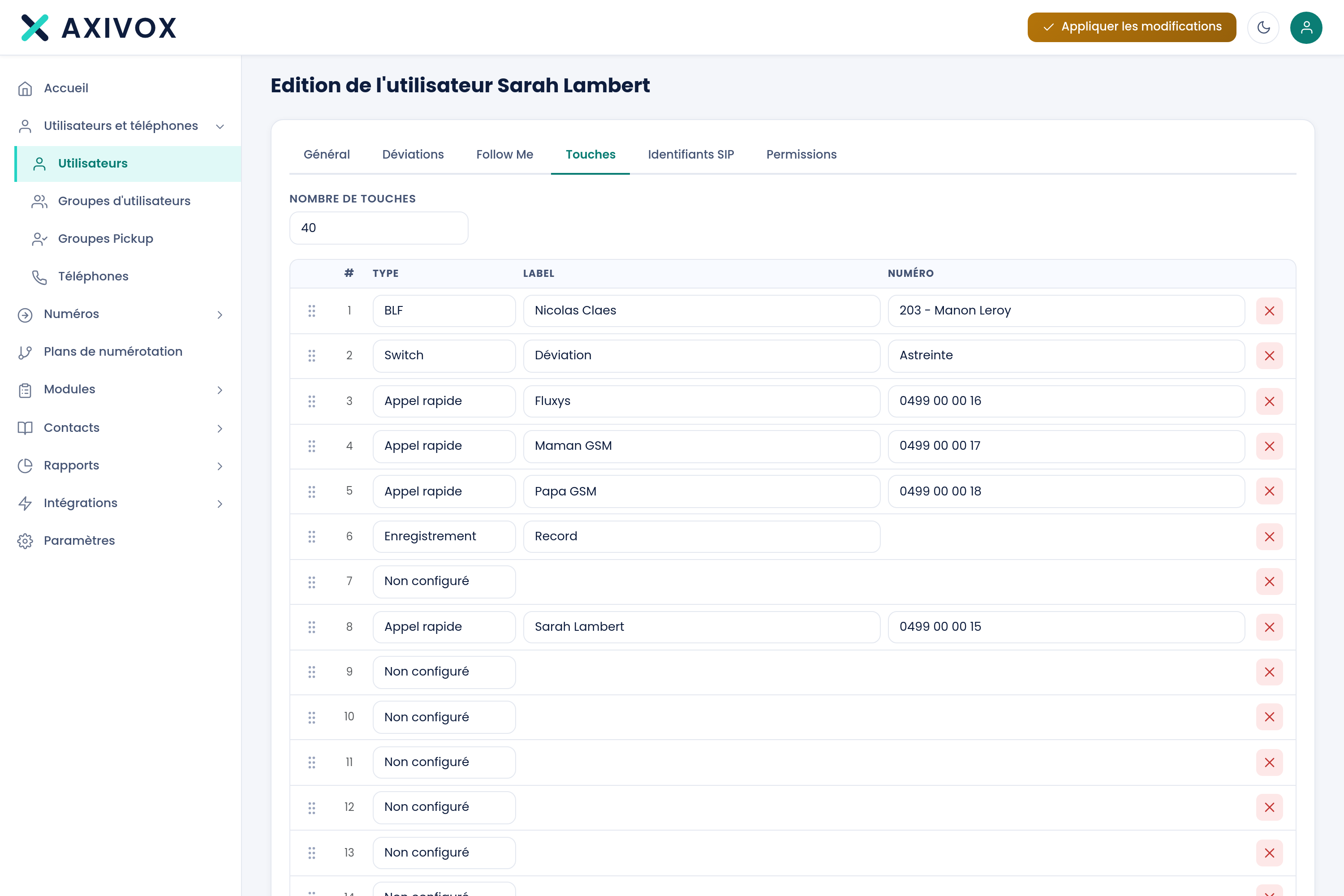
The phone's programmable keys. You decide how many it has, then what each one does. Eleven functions are available, and the field to fill in changes depending on which one you choose.
How many keys
The tab's first setting is Number of keys. It determines the length of the list below. Set it to the number of physical keys on the device, or to the number you actually want to use.
The grid
Below this setting, one row per key, with four columns.
| Column | Content |
|---|---|
| # | The key's number. Rows can be reordered by dragging |
| Type | The key's function, to choose from among fourteen |
| Label | The text shown next to the key on the phone's screen |
| number | The key's target. This field changes nature depending on the type chosen |
The fourteen functions
Here are the fourteen types, and above all what each one asks you to fill in. This is the most confusing point: the fourth column is not the same kind of field depending on the type.
| Type | What the "number" column asks for | Effect of the key |
|---|---|---|
| Not configured | Nothing | The key does nothing |
| BLF | An extension, to choose from the list | Shows whether the colleague is free, ringing, or on a call, and calls them with one press |
| Speed dial | A free-form number | Calls this number, internal or external |
| Line | An extension, to choose from the list | Gives the device a second call line |
| Switch | A switch, to choose from the list | Toggles a switch in your dial plan |
| Pickup | Nothing | Intercepts a call ringing in the pickup group |
| Do not disturb | Nothing | Turns do-not-disturb mode on or off |
| Forward | A free-form number | Forwards calls to this number |
| Voicemail | Nothing | Opens voicemail |
| Supervision (listen-in) | An extension, to choose from the list | Discreetly listens in on this extension's conversation |
| Recording | Nothing | Starts or stops recording the current call |
The most useful functions in practice
BLF, the presence indicator
This is the most requested function. The key lights up when the colleague is on a call, blinks when their extension rings, and one press calls them directly.
Supervision, with caution
Switch, to hand control to teams
A Switch key lets someone with no knowledge of the configuration toggle the dial plan, for example to activate evening on-call routing. It is the simplest way to make your teams self-sufficient without giving them access to the interface.
The Label
The label is the text shown on the phone's screen next to the key. It is purely cosmetic, but it makes the difference between an extension that gets used and one that nobody bothers with.
Putting it into service
Save, then Apply changes.
Everything you can set from your interface
See the features