Forwarding, status and my devices
Deciding where your calls go when you are not there, declaring yourself unavailable, and seeing the desk phones that share your extension.
At a glance
| Where | window menu, entry Forwarding and follow me |
| Three settings | Follow me, If I do not answer, If I am busy |
| Follow me | rings other destinations instead of you, and switches the other two off |
| The two numbers | seconds from the start of the call |
| Take a message | falls back to your voicemail when nobody answered |
| Status | the pill at the top: Available or Do not disturb |
| My devices | in the menu, the desk phones registered on your extension |
Forwarding
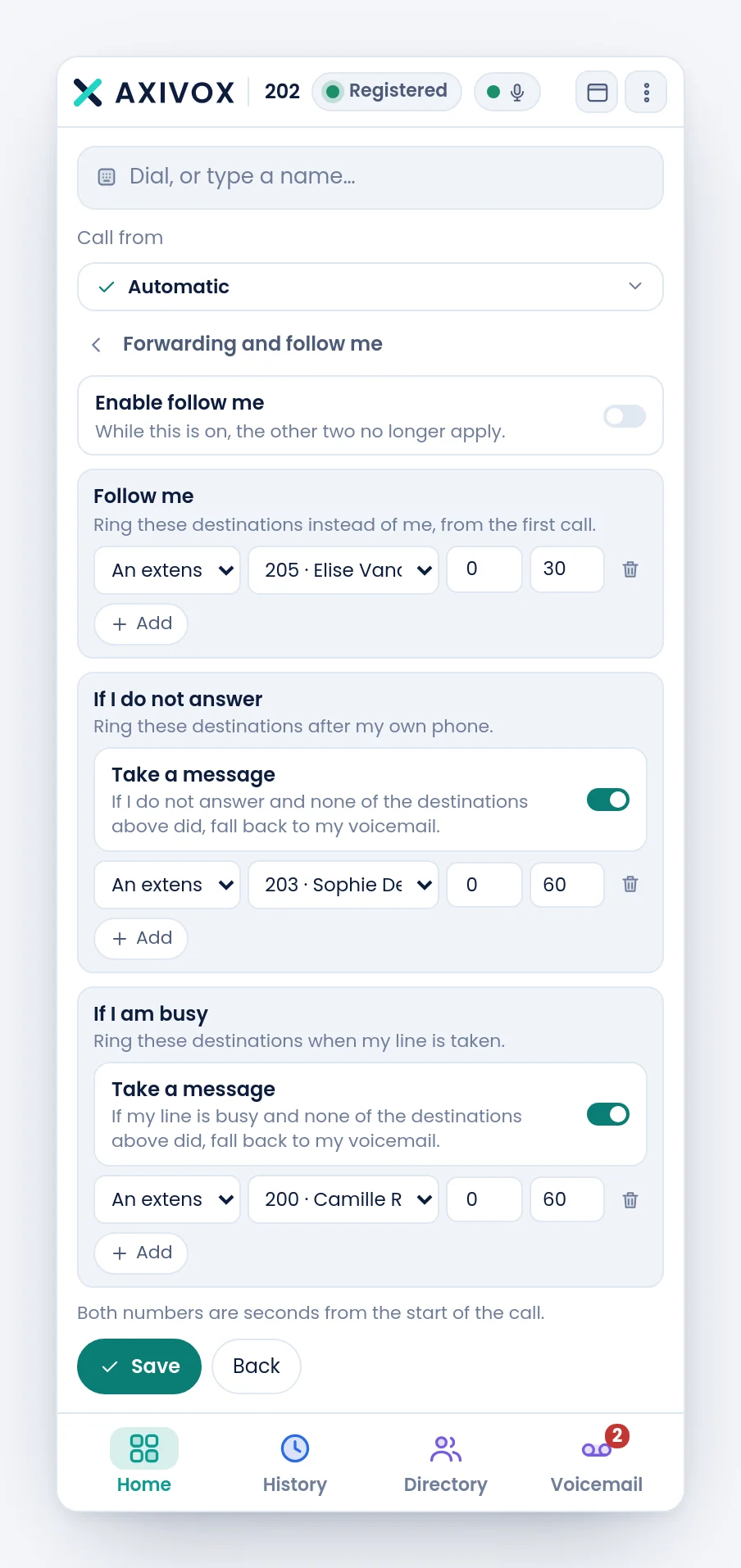
Three settings, answering three different questions.
| Setting | When it plays |
|---|---|
| Follow me | from the first call. These destinations ring instead of you |
| If I do not answer | after your own phone, when nobody picked up |
| If I am busy | when your line is already taken |
The Enable follow me switch commands the first. While it is on, the other two no longer apply: the panel says so under the title, and it is the most frequent source of confusion.
Every destination line reads left to right: the type, the destination, then two numbers.
| Type | What you choose |
|---|---|
| An extension | a colleague, from the list |
| A group | a user group of your company |
| My mobile | the GSM number set on your record |
| A number | any number, internal or external |
The two numbers are a ringing window, in seconds from the start of the call. 0 and 30 means "rings during the first thirty seconds". Two destinations with different windows ring one after the other; with the same window, they ring together.
Take a message, in each block, sends the caller to your voicemail when no destination answered.
Your status
A click on the green pill, at the top of the window, offers Available and Do not disturb.
On Do not disturb, your extension stops ringing. What becomes of the calls then depends on your forwarding: with an If I am busy rule, they go to that destination; with no rule and no voicemail, the caller hears a busy tone.
My devices
When a desk phone is registered on the same extension as you, the menu shows a My devices group with, for each one, its name and a dot that says whether it is reachable. The words next to you or elsewhere tell you whether the device is seen from the same connection as your browser.
That list is not only for information: it lets you place a call from the handset rather than from the browser. The phone answers hands-free and the softphone keeps the record and the follow-up. It is described on the page Dialling from your desk phone, later in this chapter.
Step by step
- Open the menu, then Forwarding and follow me.
- Decide first whether you want Follow me: if so, turn the switch on and fill in that block only, the other two will be ignored.
- Otherwise leave it off and fill in If I do not answer, then If I am busy.
- For every destination: choose the type, the destination, then the ringing window in seconds.
- Turn Take a message on if you want the caller to be able to leave a message when nobody answered.
- Click Save, then Back.
- Check: have someone call you, and make sure the call lands where you expect.
If it does not work
I set "If I do not answer" and nothing happens. Check the Enable follow me switch at the top. When it is on, it makes the other two blocks inoperative.
"that extension does not exist", "that group does not exist". The saved destination no longer matches anything: the extension or the group has been deleted since. Choose another one from the list.
"no mobile is set on your extension". The My mobile type uses the GSM number field of your record. Without that number, it has nothing to call. Your administrator fills it in from the portal.
"the end must come after the start". The two numbers are the wrong way round. The first is the start of the window, the second its end.
"Saved, but not active on the call server yet." The setting was taken, but the telephony has not picked it up yet. Try again in a moment; if it persists, report it.
My forwarding rules have disappeared. An administrator can change them from the portal, tabs Forwarding and Follow Me of your record. It is the same setting, seen from both sides.
The "My devices" group does not appear in the menu. No desk phone is registered on your extension. With no physical device, there is nothing to list.