Call list
The complete history of your calls, with filters and an export. This is the screen you use to find proof of what actually happened.
The columns
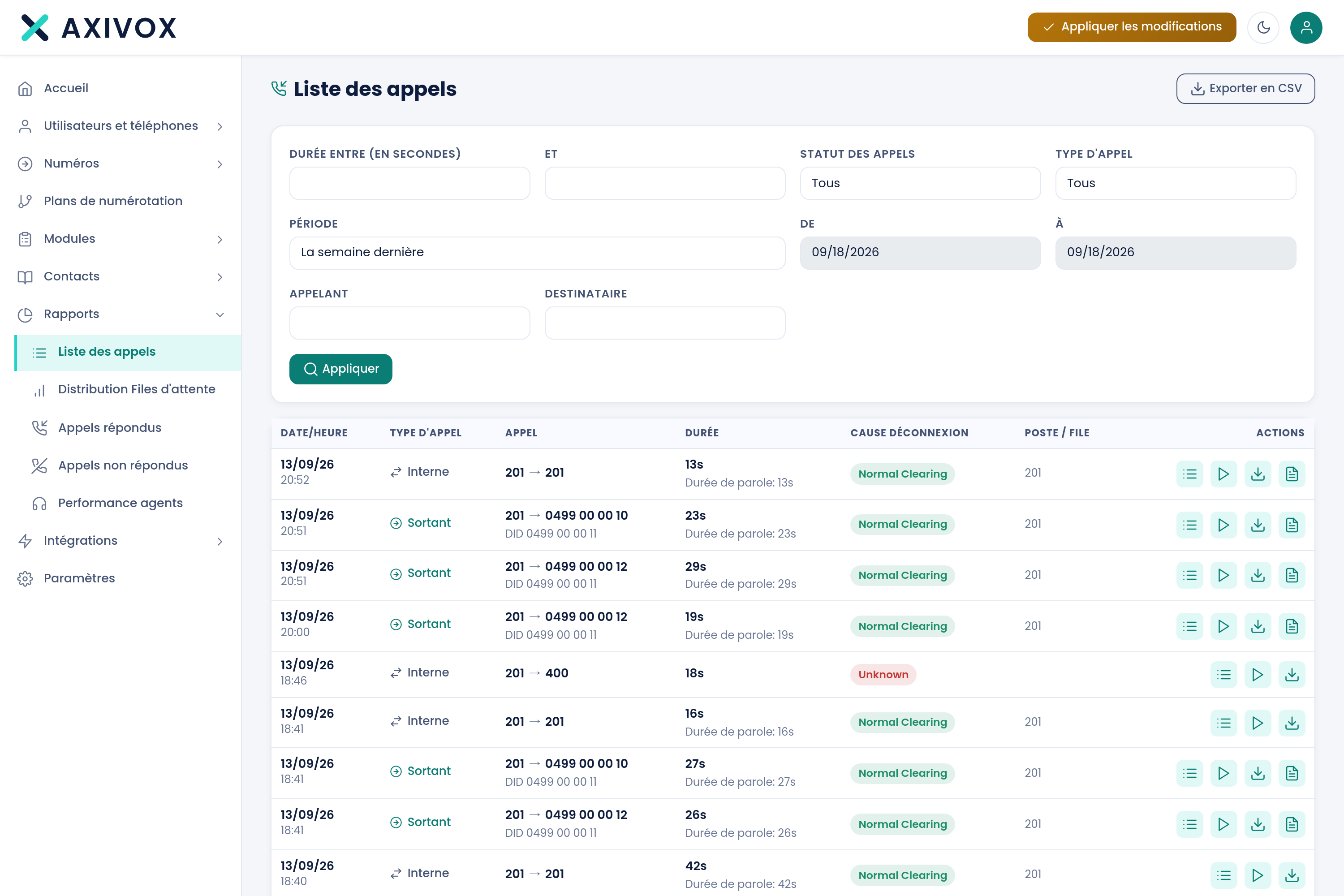
| Column | What it shows |
|---|---|
| Date and time | The moment of the call |
| Call type | Inbound, outbound or internal |
| Call | The parties involved |
| Duration | The total duration, with talk time below it |
| Disconnection cause | Who hung up, and why |
| Extension or queue | The extension or queue that handled the call |
| Tags | The tags applied to the call, as coloured pills. The column stays empty for a call without tags |
| Call variables | The number of variables the call carries. A click on that number shows them, with their values. The column stays empty for a call without variables |
| Recording | The recording, if one exists |
The filters
The filters can be combined.
| Filter | Values |
|---|---|
| Call status | Answered, Unanswered, All |
| Call type | All, Inbound, Outbound, Internal |
| Tags | The tags of your list, to tick. This filter only appears if you have defined at least one tag |
| Period | Today, Yesterday, This week, Last week, This month, Last month, or Other |
| From and to | Two dates, when you choose the "Other" period |
| Caller | A number or a name |
| Recipient | A number or a name |
| Duration between and | Two bounds in seconds |
The Apply button runs the search. The number of results is shown above the list, which you browse page by page. With Tags, a call is shown as soon as it carries at least one of the ticked tags.
Finding calls by tag
A tag is a word of your vocabulary, applied to a call by your dial plan (Tag module) or by the user, from the softphone, during the conversation. It appears in the Tags column once the call has ended.
To count last week's complaints, choose the period, tick the tag and click Apply: the number of results shown above the list is the answer. Tags are created in Modules, Call tags: see the page Call tags.
Exporting
The Export to CSV button produces a file of the current selection, with filters applied. This is what you use for analysis in a spreadsheet, or to hand over a record.
Diagnosing a complaint
The sequence that works, when a customer claims they couldn't reach anyone:
- Filter on their number in Caller, for the period concerned.
- Check the status: did the call arrive, and was it answered?
- If unanswered, check the extension or queue: where did it ring?
- Check the disconnection cause: did they hang up themselves, or was the call cut off?
These four pieces of information are almost always enough to tell apart a call that never arrived, a call that arrived at the wrong place, and a caller who didn't wait.
What each report measures, and how to read it
See the Queues and statistics page