Unanswered calls
Calls that entered a queue and left with no one on the other end. This is the most useful report, and the least consulted one, because it names what you're losing.
At a glance
| Where | Reports, Unanswered calls |
| What it shows | three counters, the breakdown of abandons over time, then the detail queue by queue |
| Filters | Queue, From, To. No SLA field on this screen |
| What it doesn't show | the numbers to call back. They're read in the Distribution report or the Call list |
| If the period is empty | "No unanswered calls for this period" |
How it works
An unanswered call is a call that entered the queue and left without being connected. The report tells two apart, which don't call for the same fix:
- Abandoned: the caller hung up while waiting. It's a wait-time problem, so a greeting or a staffing issue.
- Timeout: the call ran out the queue's maximum wait time and left. It isn't lost for that: it carried on in your dial plan, towards another extension or voicemail.
The Unanswered counter is the sum of these two. A third situation is counted separately, in the Ring cancelled column: the caller hung up while the agent's phone was ringing. It doesn't count towards the unanswered total.
The Abandoned by wait time breakdown uses the same seven brackets as the answered calls report: ≤15s, 16-30s, 31-45s, 46-60s, 61-90s, 91-120s and >120s. The Cumulative abandons table is cumulative, with six fixed thresholds: 5, 10, 15, 20, 30 and 60 seconds.
What the screen shows
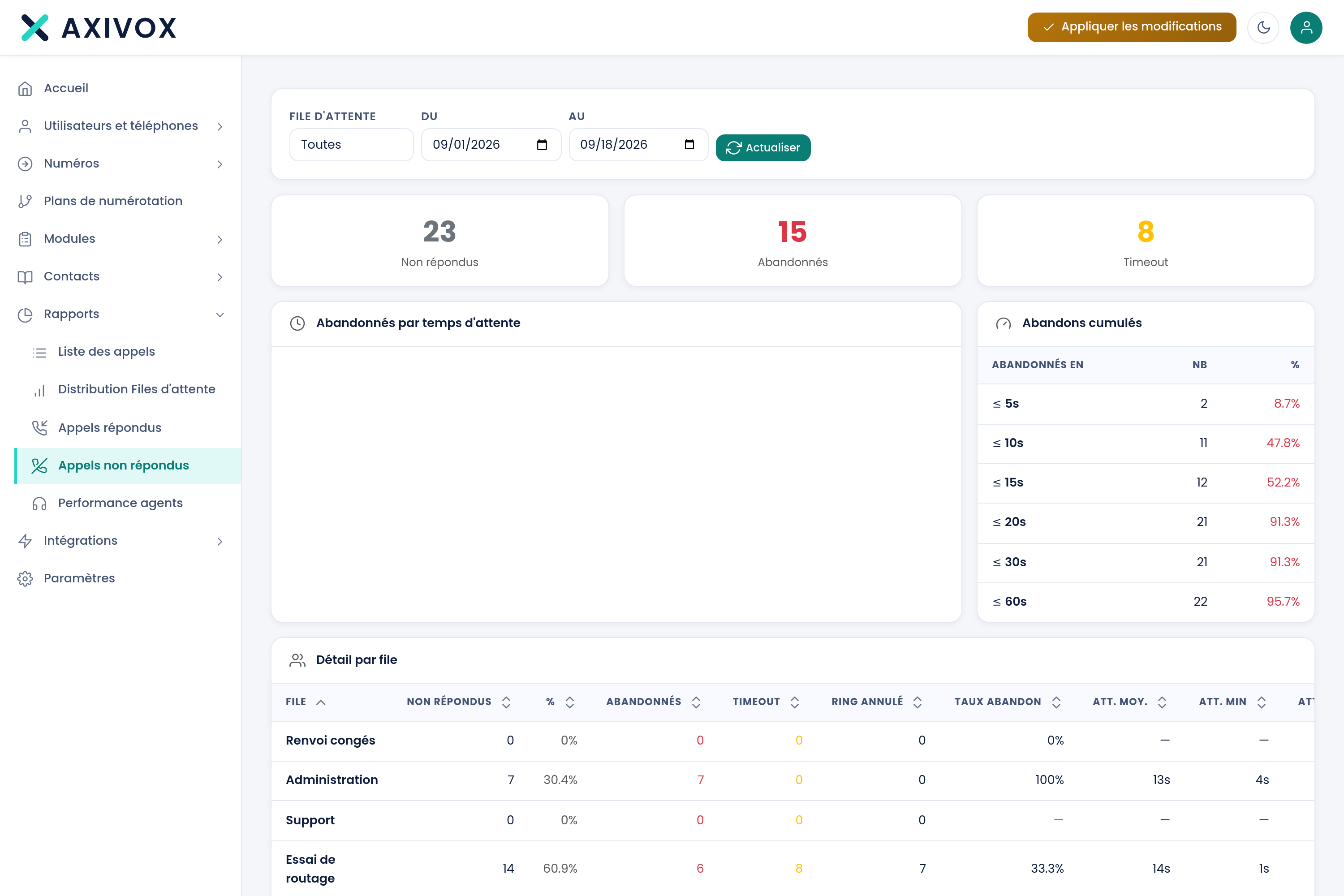
The three tiles at the top: Unanswered, Abandoned, Timeout.
The Detail by queue table:
| Column | What it shows |
|---|---|
| Queue | the queue's name |
| Unanswered, then % | abandons and timeouts added together, and their share of the total across all queues |
| Abandoned | the caller hung up while waiting |
| Timeout | the call left the queue after the maximum wait time |
| Ring cancelled | the caller hung up while the agent's phone was ringing |
| Abandon rate | unanswered calls set against the calls that entered the queue |
| Avg., min, max, total wait | the time spent waiting before leaving |
| Avg. position | the caller's position in the queue at the moment they left |
Steps to follow
- Open Reports, then Unanswered calls.
- Choose the queue and the period, then click Refresh.
- Read Abandoned and Timeout separately first: the first figure is the only one that measures what you actually lost.
- Look at the Abandoned by wait time chart to see at what second your callers give up.
- To get the numbers to call back, open the Distribution report, set the same period, and click the row for the slot concerned: the detail gives the number, the time and the event for each call.
- Call them back.
Automating detection
You can also be notified without checking this report: put a Notification module on the timeout exit of your queue, with the caller's number in the text. The callbacks to make then land straight in your inbox, with nobody needing to open a screen.
If it doesn't work
This report doesn't give me the numbers to call back. This screen counts, it doesn't list. The numbers are in the Distribution report: click a table row and the call list for that slot opens, with the number and the event. The Call list gives you the same thing across all your calls.
Ring cancelled calls aren't in the unanswered total. That's intentional. The total counts queue exits; a cancelled ring happens afterwards, during the ringing at the agent's end. Add them together yourself if you want the number of callers who left with no answer at all.
The abandon rate is higher than I expected. It sets unanswered calls against the calls that entered the queue, timeouts included. If your queue hands back many calls to the dial plan after the maximum wait time, this rate rises even though those calls were handled elsewhere.
A call that exited by timeout was nonetheless taken by someone. That's normal: it left the queue and carried on in the dial plan. The rest of its journey isn't read here but in the Call list.
The figures seem to be off by a day. Check the time zone in Settings. The From and To bounds are interpreted at the time of your installation.
What each report measures, and how to read it
See the Queues and statistics page