Users
A user is a person reachable by a short number inside your company. It is the basic building block: everything else, queues, dial plans, phones, builds on top of it.
Pages in this section
What a user corresponds to
Each user has an internal number, often called an extension. It is the number your colleagues dial to reach the person, and it is also what you will name in a dial plan or a queue.
A user is not a phone. The same person can connect from a desk phone, a softphone on their computer, and a mobile: it is always the same user, so the same internal number.
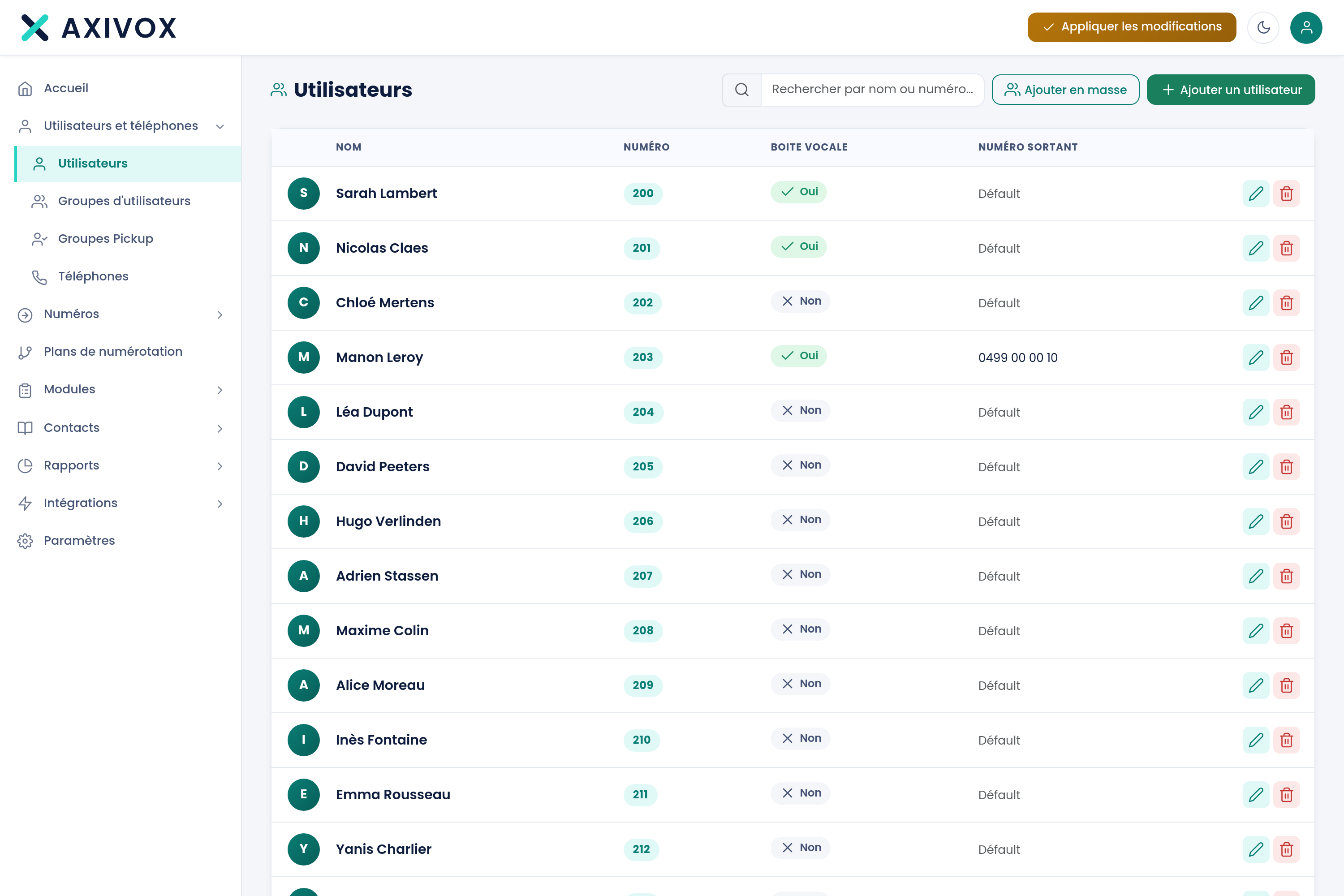
Reading the list
| Column | What it shows |
|---|---|
| Name | The name shown on your colleagues' phones during an internal call |
| Number | The internal number, the one dialed to reach the person |
| Voicemail | Shows whether voicemail is active for this extension |
| Outgoing number | The number shown to the person this user is calling when calling outside |
The Default label in the Outgoing number column means the extension uses the company's main number. You can assign a specific outgoing number to a person, for example so a salesperson displays a direct line.
Searching for a user
The search field at the top right filters the list as you type. It accepts both a name and a number, which is handy when you have an internal number in front of you and want to know who it belongs to.
Adding a user
The Add a user button opens the creation form. At minimum, you fill in the name and the internal number.
- Click Add a user.
- Enter the name, as it should appear on phones.
- Choose the internal number. The interface tells you if it is already taken.
- Enable voicemail if the person needs to be able to receive messages.
- Save, then click Apply changes in the top bar.
Creating with AI
The Create with AI button lets you describe what you want in plain language, for example "add Camille Renard on extension 215 with voicemail," and the interface prepares the creation for you.
The result is always shown to you before saving: review it, correct it if needed, then confirm. AI saves you the typing, it does not decide in your place.
Editing or deleting
Each row ends with two actions. The pencil opens the extension's record. The trash can deletes it.
What you can do next
Once your users are created, two directions open up. To give them a device, go to Phones. To decide where calls from outside arrive, go to Dial plans.
Everything you can set from your interface
See the features