Invoices
View the list of your invoices, download them as PDF and, if card payment is enabled on your account, settle the ones still due online.
At a glance
| Where | user menu, top right, Invoices entry |
| What the screen lets you do | view, download, and sometimes pay |
| Columns | Date, Number, Amount excl. VAT, Status |
| Statuses | Pending payment, Paid |
| Pay button | only on a pending invoice, and only if card payment is enabled on your account |
| Invoices issued from 2026 onward | on the customer portal, www.axivox.com |
| Call detail | Invoice details entry, in the same menu |
| Who has access | accounts that have been granted access to invoices |
How it works
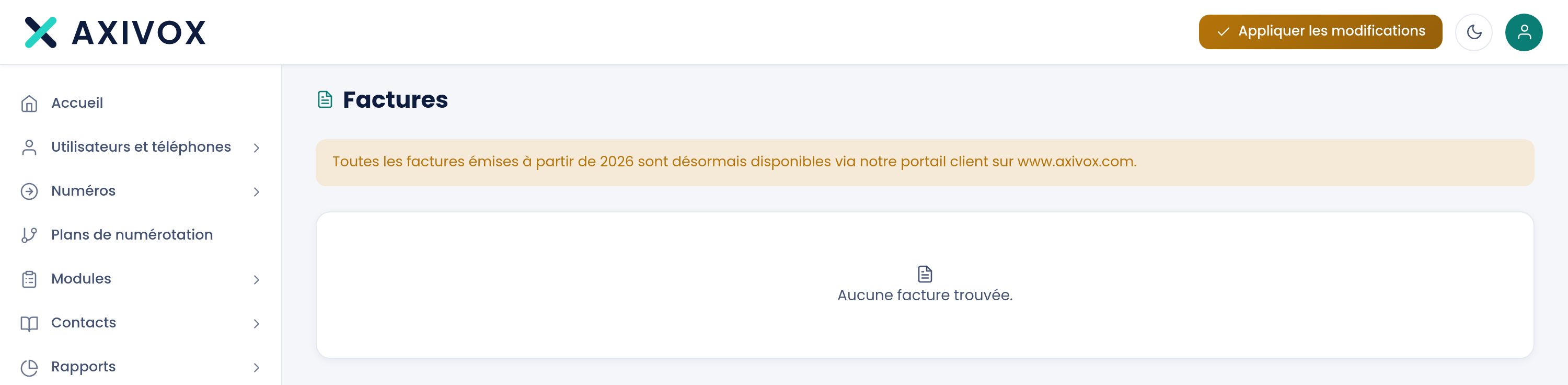
The screen permanently shows, above the list, an orange banner: "All invoices issued from 2026 onward are now available through our customer portal at www.axivox.com." Read it before wondering why a recent invoice isn't here.
The list fits in a single table. The Download button opens the invoice's PDF. The green Pay button only appears on rows marked Pending payment, and only if card payment is enabled on your account: it takes you to the secure payment page.
When no invoice matches, the screen shows "No invoice found."
What the screen shows
| Column | What it contains |
|---|---|
| Date | the invoice's issue date |
| Number | the invoice number, the one to quote if you write to us |
| Amount excl. VAT | the amount excluding value-added tax: the amount actually due on your bank statement is higher |
| Status | Pending payment in orange, Paid in green |
| Last column | Download, and Pay when both conditions are met |
Steps to follow
- Click the person icon, top right of the screen, then Invoices.
- Read the orange banner at the top of the page: invoices issued from 2026 onward aren't in this list.
- Find the row you want by its Date and Number.
- Click Download to get the PDF.
- For a Pending payment invoice, click Pay if the button is offered, and follow the payment page through to the end.
- To understand an amount, open Invoice details in the same menu, and filter on the invoice concerned.
If it doesn't work
"No invoice found." Two explanations. Either no invoice has been issued on your account yet. Or your invoices are dated after 2026, in which case they're on the customer portal, www.axivox.com, as the banner at the top of the screen states.
The Pay button doesn't appear. It only shows on an invoice marked Pending payment, and only if card payment is enabled on your account. On an invoice already marked Paid it has no reason to be there. If you'd like to pay by card and the button is missing, ask us to enable that option.
"Error while starting the payment" The payment page couldn't be opened. Try again in a few minutes. If the message comes back, settle the invoice by bank transfer and let us know.
The amount doesn't match my bank statement. The column is called Amount excl. VAT: it gives the amount excluding value-added tax. The downloaded PDF carries the total amount including tax.
The Invoices entry isn't in my menu. Access to invoices is granted account by account. Ask your installation's administrator to grant it to you, or log in with the administrator account.