Axivox/Features
Features

Axivox breaks the mould.

The dial plan is drawn and written by AI, the call queries your software live, the analysis of your conversations stays on our servers. And everything a phone system should do, obviously, is set in the same interface.

What makes the difference

What we have on top

Business telephony looks the same from one provider to the next. Six functions we built ourselves, and that your teams run without ever having to call us.

Your dial plan, drawn and written by AI

Describe your greeting in one sentence. The assistant builds the plan, creates the announcements that are missing, and shows you the diagram. Nothing replaces your current plan until you've confirmed it. Then you fine-tune it with your mouse, module by module. Nobody else offers this.

The call queries your software, live

While the phone rings, the dial plan questions your CRM or any API, keeps the answer, and decides what happens next: a key account to its sales rep, an overdue invoice to accounting. A phone system that reads your data, not just one that rings.

The call analyses itself, and it stays with us

Transcript, summary, tone of the exchange, themes, flagging what deserves a follow-up call. All of it produced on our own servers, in Europe, with no external AI service ever hearing your calls.

A softphone that acts inside your CRM

From the call, you open a ticket in the right team, an opportunity, an activity, a signature request, under your own name. You transfer a call by dragging it onto a colleague, and take it with you on your mobile with one tap. The handset can't do any of that.

The tools of a contact center, in your phone system

Queues, wallboard on a wall screen, four reports, statistics on queues and ordinary calls, listen, whisper and barge-in to coach an agent. Call-center tools, in a system you administer yourself.

A voice agent that picks up for you

At times when nobody can take the call, or as a first filter, a voice agent answers in your name, understands the request, qualifies and transfers it. It sits in the dial plan like any other module, next to the rest.

And the rest

Everything you'd expect from a phone system, obviously

None of the above would come at the expense of the basics. They're here, in the same interface, run by your teams. We don't boast about it: it's the bare minimum.

Extensions and phones set up in six tabsNumbers in 100 countries, each one redirected in two clicksAny SIP phone, Snom and Yealink with zero setupVisual voicemail: your messages, transcribed and readableText-to-speech for your announcementsConferences and call pickupShared directories and blacklistHotdesking: your extension follows you from one phone to anotherOn-call switches, flipped with one tapDial from your desk phone
The interface

What your teams open every morning

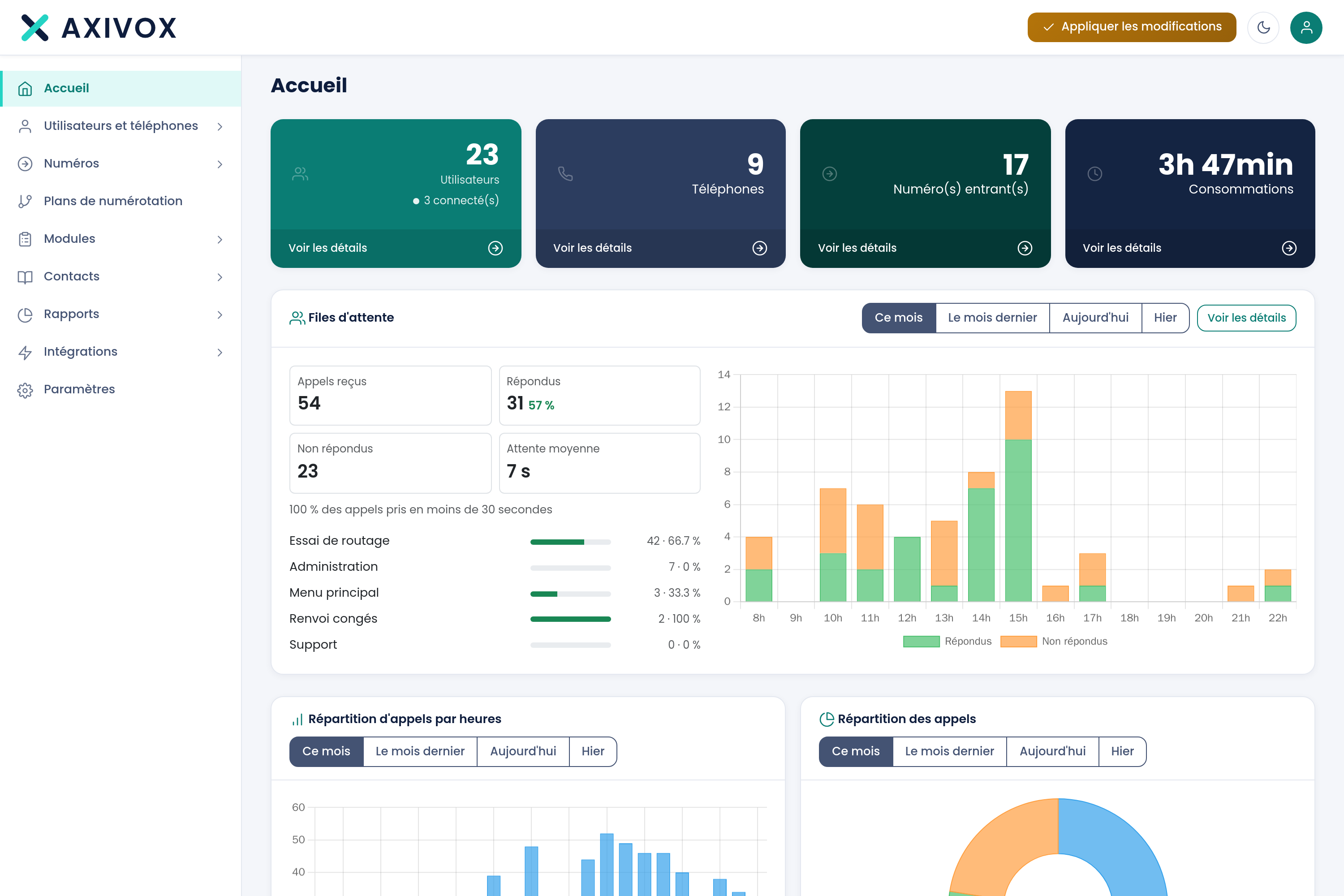
The dashboard answers three questions at a glance: how many extensions and numbers do you have, how are your queues doing, and how much have you used.

  • Four counters up top, queue activity underneath
  • The counters update throughout the day
The dashboard, when you open a session.

Everything is set from a single interface, by your teams, in a few seconds.

100countries covered
0ticket to open
Day to day

Create an extension, plug in a phone

Two screens cover most of the day-to-day administration work.

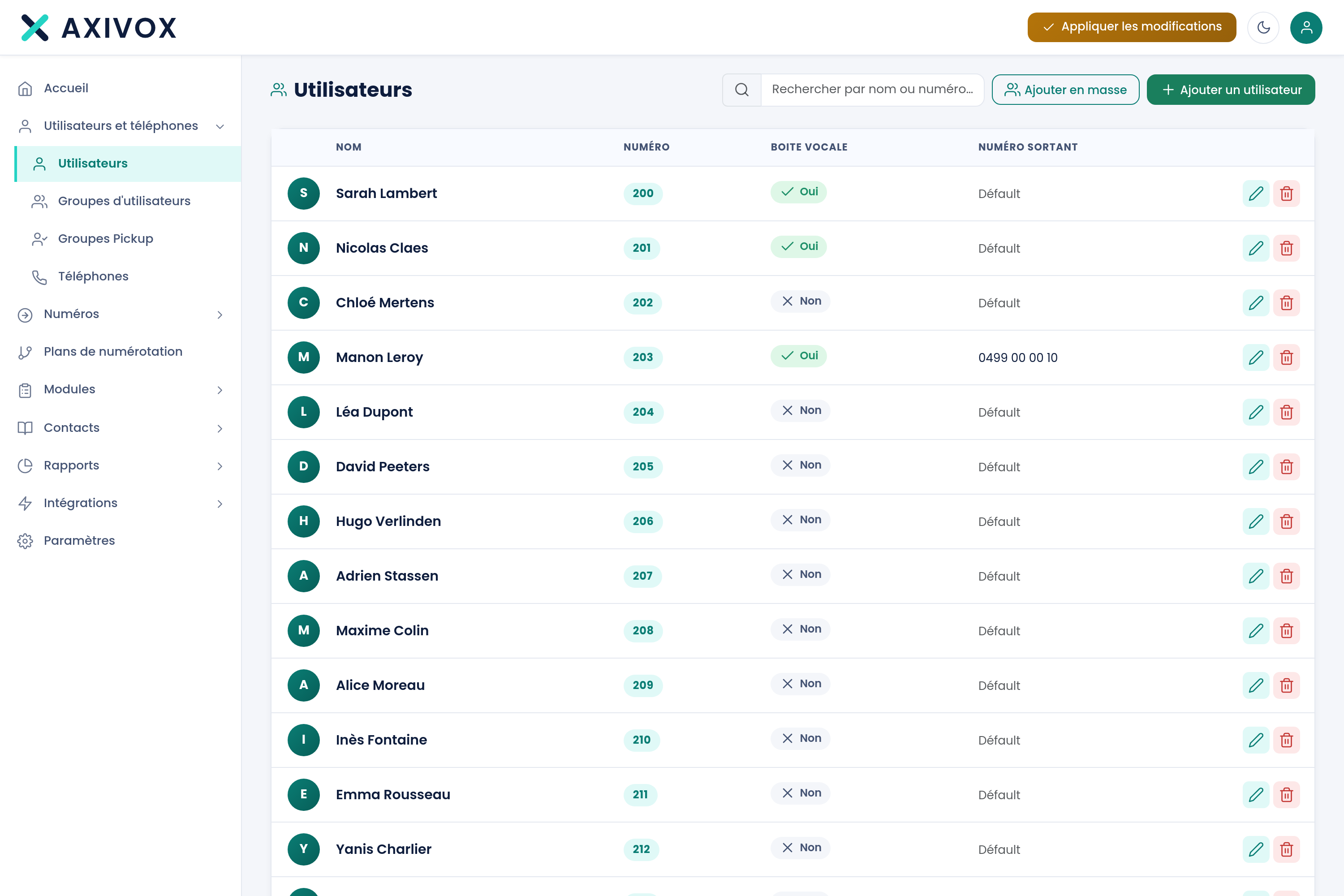
The list of users: extension, voicemail, outbound number.
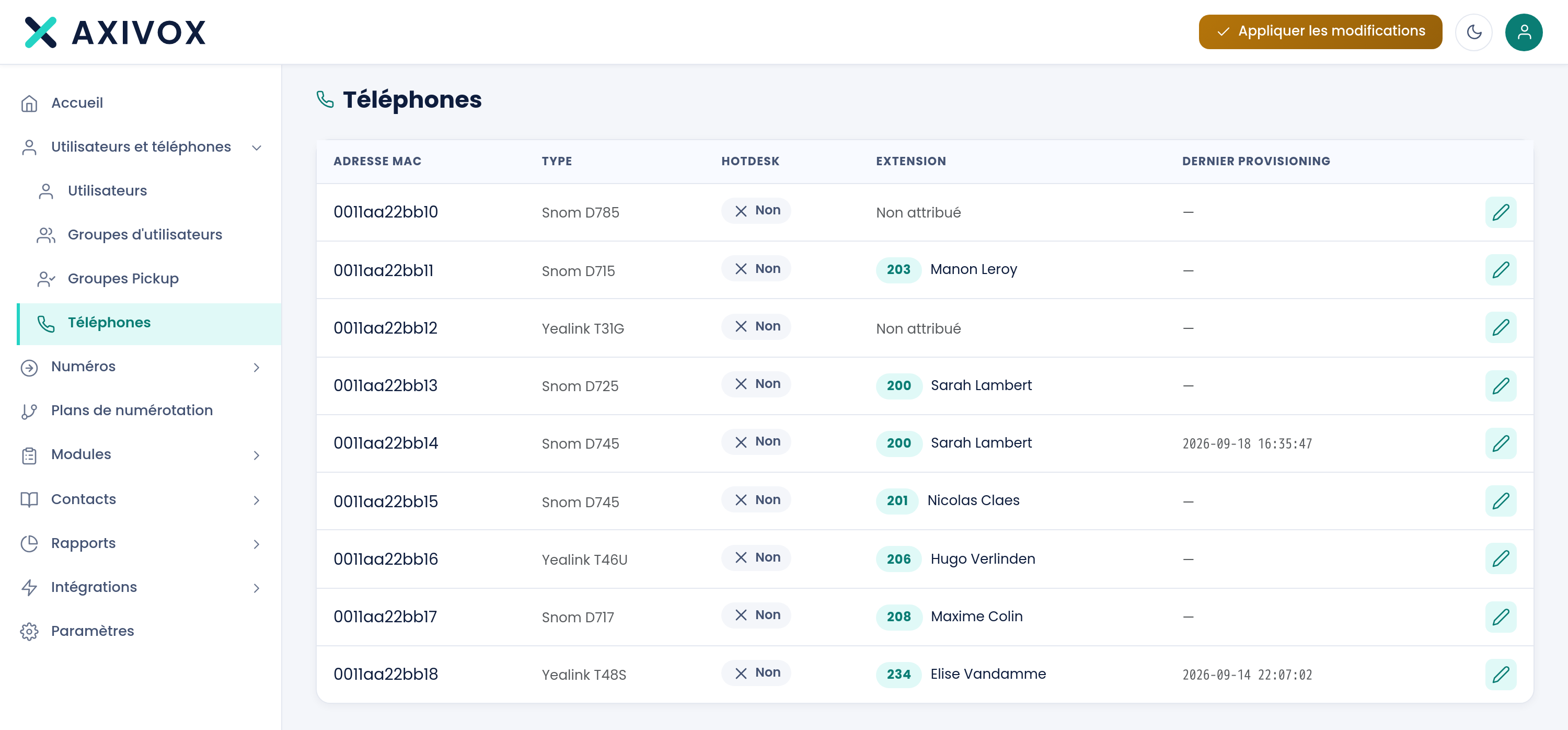
Phones, recognised by their MAC address and attached to an extension.
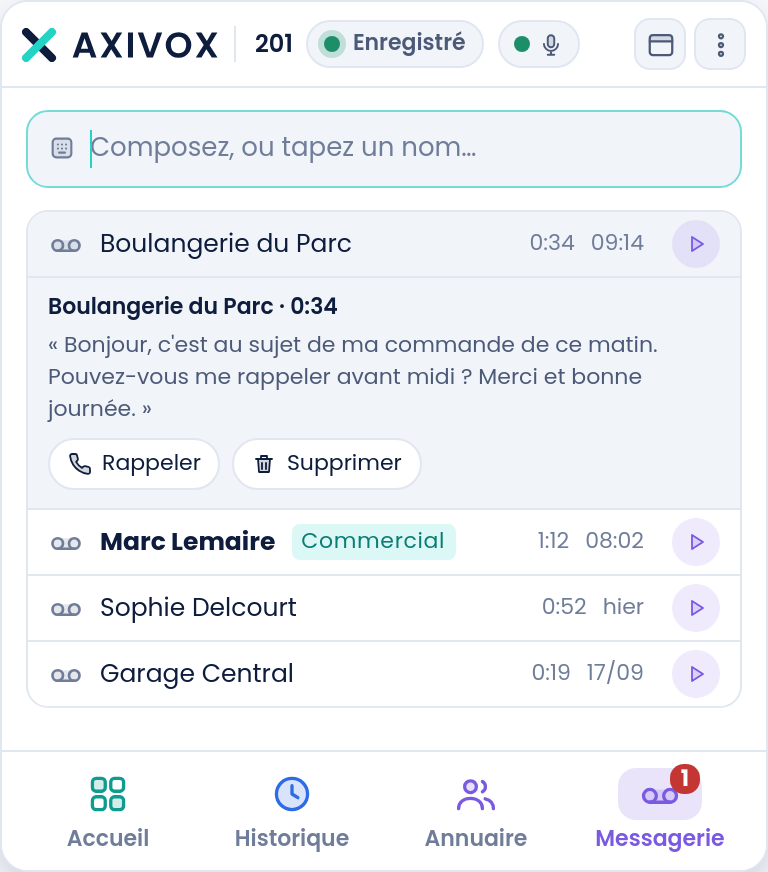
Visual voicemail: every message with its duration, playback and transcript.
Voicemail

Your messages, readable

The list, the audio, the transcript. Listen to the one that matters, skip the rest, and read the transcript when you can't listen.

  • The message also arrives by e-mail
  • The transcript saves you listening just to find out
  • Between two meetings, you deal with it instead of putting it off
Dial plans

The path of your calls, drawn with your mouse

The path of a call is built like a flowchart: you drop modules, you connect the outputs.

  • Twenty-six modules, from a simple greeting to fully custom
  • One plan serves several numbers
  • Editable as many times as you need, without us
Un plan d'appel miniature : appel entrant, condition horaire, file d'attente aux heures d'ouverture, boîte vocale en dehors, et débordement vers un agent vocal.Welcome planin serviceIncoming callfrom a numberYour hoursopen or closedQueueto your agentsVoicemailmessage by e-mailAI voice agentit answersopenclosedoverflow
The catalogue

Twenty-six modules, four families

The first three cover nearly every need. The fourth exists for setups that talk to your own systems.

Route (7 modules)

Send the call to a destination

  • Start, The entry point of the plan, one per plan
  • Call, Ring an extension, a group or an external number
  • Queue, Hold and distribute to agents
  • Dispatcher, Split calls across several destinations
  • and 3 more

Decide (6 modules)

Pick a branch based on a rule

  • Menu, The IVR: one key, one branch
  • Time condition, One output per window: open, lunch, closed, holidays, public holidays
  • Switch, A two-position toggle, flipped by your team
  • Multi-Switch, A selector with several positions
  • and 2 more

Speak and record (5 modules)

Play, collect, trace

  • Play a file, Play an announcement or music
  • Voicemail, Take a message and send it by e-mail
  • Record, Record the conversation
  • Caller ID, Rewrite the number or name presented
  • and 1 more

Advanced modules (8 modules)

For custom setups

  • Variable, Remember a value for the length of the call
  • Condition (If), Branch based on a variable's value
  • Switch / Case, Branch among several possible values
  • DTMF entry, Ask for a code or a file number
  • and 4 more
Control

Your changes go live when you decide

You prepare a change, review it, and it takes effect the moment you click Apply. So you can redesign your greeting in the middle of the day and only switch it on that evening.

Trois modifications préparées attendent, et un bouton unique les applique quand vous le décidez.Changes pending3New extension 214Camille RenardreadySupport queuestrategy changedreadyOn-call dutyactivereadyApply changesNothing goes out until you click
What you gain

Four reasons to trust us with your telephony

Simplicity

Your teams stop waiting on anyone

Creating an extension, changing a destination, opening on-call duty: a few seconds, done by your teams, no ticket and no waiting.

Flexibility

The system follows your organisation

The path of your calls is drawn like your org chart. The day your organisation changes, you redraw it yourself.

Artificial intelligence

A voice agent that picks up at night

It understands the request in natural language, books an appointment, and hands off to a human with the full context.

Integrations

Your telephony talks to your software

Odoo both ways, and your own systems queried during the call to route to the right place.
Quote

Show us your organisation, we'll show you its dial plan.

Thirty minutes on a video call, with a platform engineer.

  • You leave with the diagram of your routing and a price
  • No installation, no commitment
  • Reply within one business day
Get a priced quote now

Five more fields, and we'll reply with an amount instead of a question.

Your traffic
Your numbers
Your destinations
Billing address optional

Response within one business day. Without the price fields, we'll call you back to talk it through.