Opening the softphone
Your desk phone in a browser tab, with nothing to install. One address, one microphone permission, and the Registered pill that says the line is up.
At a glance
| Address | phone.axivox.com |
| To install | nothing. A recent browser is enough |
| What the browser asks for | access to the microphone. Without it, the other party will not hear you |
| The sign that it works | the green Registered pill, at the top of the window |
| Window width | a fixed column, the height follows the content |
| Several tabs open | one line for all of them. The others show Other tab |
| What it takes to sign in | your Axivox account, not your SIP credentials. See Signing in to the softphone |
How it works
The softphone is a web page that carries a real desk phone. The voice does not go through the web server: it leaves your browser for our platform, encrypted, over WebRTC. That is why the browser asks for permission to use the microphone, and why refusing that permission leaves you with a line that rings but stays silent.
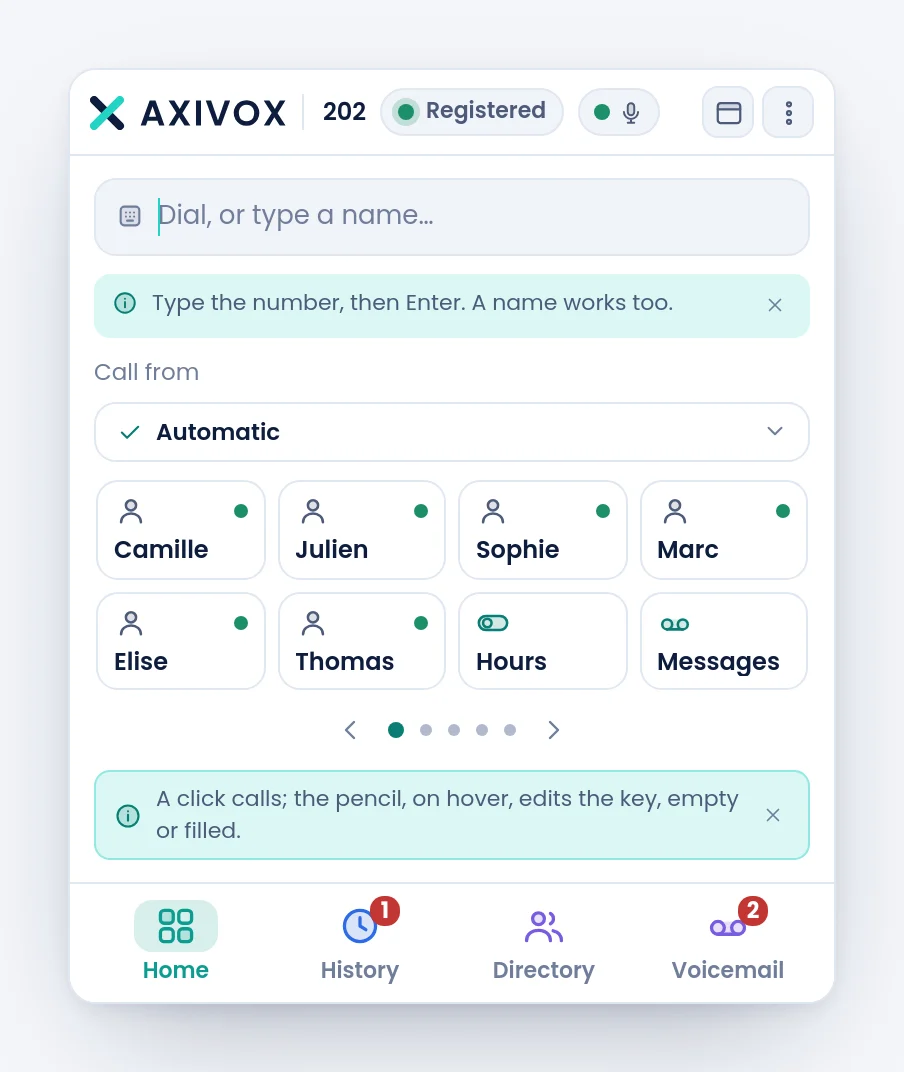
The first opening shows two hints, one under the command bar and one under the keys. A click on their cross closes them for good.
Step by step
- Open phone.axivox.com in your browser.
- Sign in with your Axivox account. The next page of this guide covers that screen, and the trap to avoid.
- The browser asks for microphone access. Answer Allow. If you answer otherwise, nothing will warn you when the call comes.
- Wait for the green Registered pill at the top of the window. While it shows Connecting…, the line is not up and you will receive no calls.
- Check: the microphone dot, just to the right, must be green. Speak, and it reacts. Its tooltip reads Microphone: sound is captured.
- Place an internal call to a colleague, then have someone call you from outside.
If it does not work
The pill stays on "Connecting…" or turns to "Reconnecting…". Your workstation is not reaching our platform. The softphone connects to pabx.axivox.com on port TCP 3443, and the voice uses ports UDP 20000 to 40000. A corporate firewall that closes either one produces exactly this symptom. Your network manager can ask us for the port opening document.
I hear the other party, but they cannot hear me. The microphone. Either the permission was refused, or the browser picked the wrong device. The microphone dot turns red and its tooltip reads Microphone: no sound. Pick the device in the menu, entry Microphone, then try again.
The browser never asked me for microphone permission. It was already granted or refused once for this site. Open the site settings in your browser, set the microphone back to Ask or Allow, then reload the page.
I have two tabs open and one shows "Other tab". That is the intended behaviour. The line can only be carried by one tab at a time. The mirrored tab stays usable for calling and hanging up.
The softphone does not ring while my desk phone does. Check the pill first. If it is green, check your computer volume and the output device chosen in the menu, entry Output and ringtone.
I cannot find the window again after clicking elsewhere. In the browser it is a tab like any other. In the desktop application, the cross does not close the program, it puts it in the system tray: its icon brings it back.