My numbers
Your incoming numbers, and above all what happens when someone dials them. A number with no destination configured is useless.
Pages in this section
The list
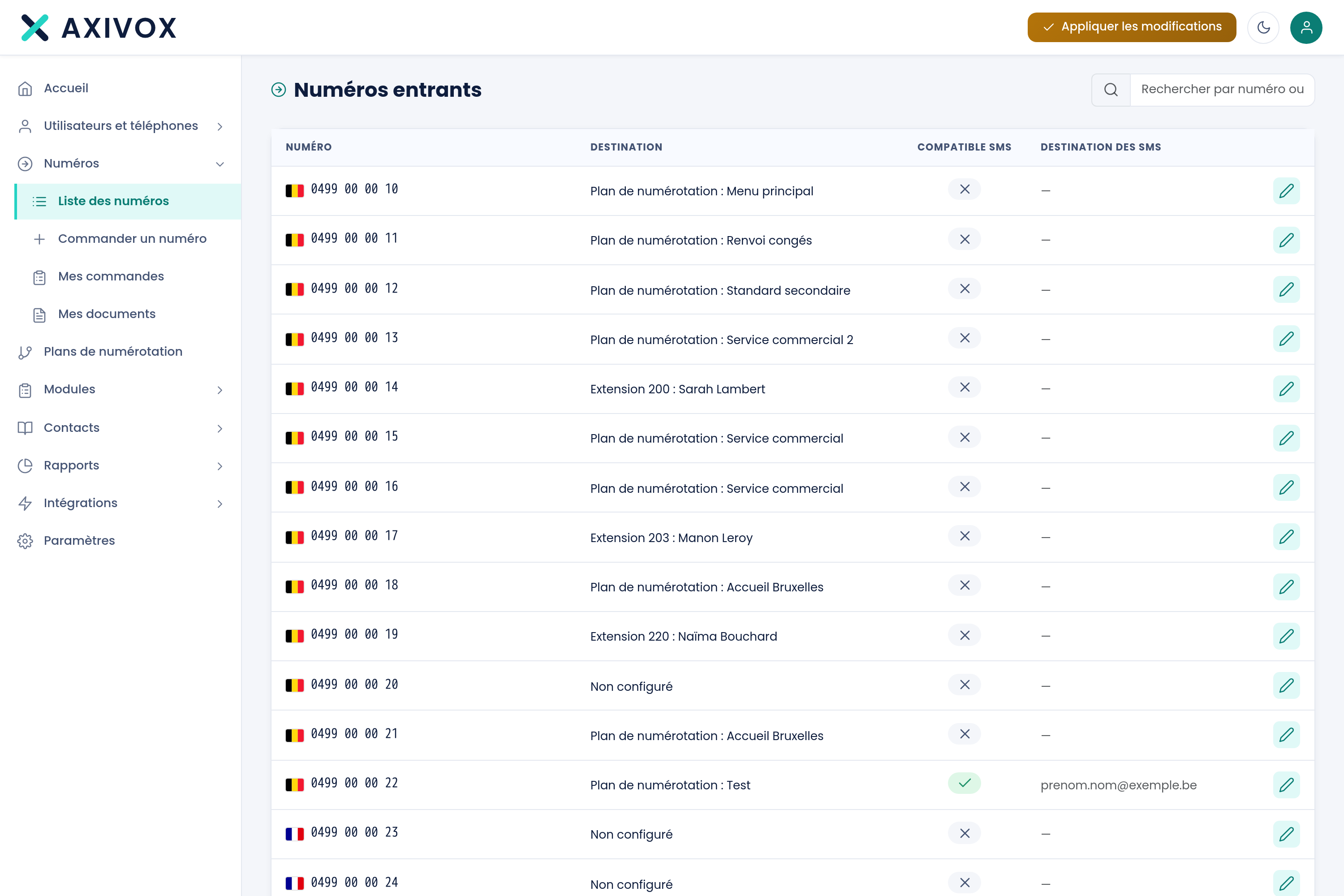
| Column | What it shows |
|---|---|
| Number | The number, with its country's flag |
| Destination | Where the call arrives. "Not configured" means the number leads nowhere |
| SMS compatible | Whether the number can receive SMS |
| SMS destination | The address incoming SMS are forwarded to |
Configuring the destination
The pencil opens the record. It works in two steps: you first choose a destination type, then the matching target.
Six types are offered:
| Type | What the call becomes |
|---|---|
| Not configured | The call does not go through |
| Extension | It rings directly on an extension |
| Dial plan | It enters a path you have designed |
| Voicemail | It goes straight to a voicemail |
| Hang up | It is rejected immediately |
| Conference | It enters a conference room |
The second list changes based on the type chosen: extensions if you picked Extension, your plans if you picked Dial plan, and so on.
SMS
An SMS-compatible number can forward received messages to an email address, shown in the SMS destination column. Not every number is compatible, it depends on the country and the carrier.
Ordering a number
Two menu entries complete this screen: Order a number, which lets you choose a country and an area code, and My orders, which tracks the progress of your requests.
The countries covered and how a number is ordered
See the Coverage page