User record: General tab
The record's first tab. Eleven settings that define the extension's identity, what it shows when it calls out, and three behaviors that often get overlooked.
Opening the record
From Users, click the pencil at the end of the row. The page address becomes /extensions/ followed by the extension number, for example /extensions/200: you can therefore bookmark a record.
The record has six tabs: General, Deviations, Follow Me, Keys, SIP Credentials, and Permissions. Each is covered in its own article in this guide.
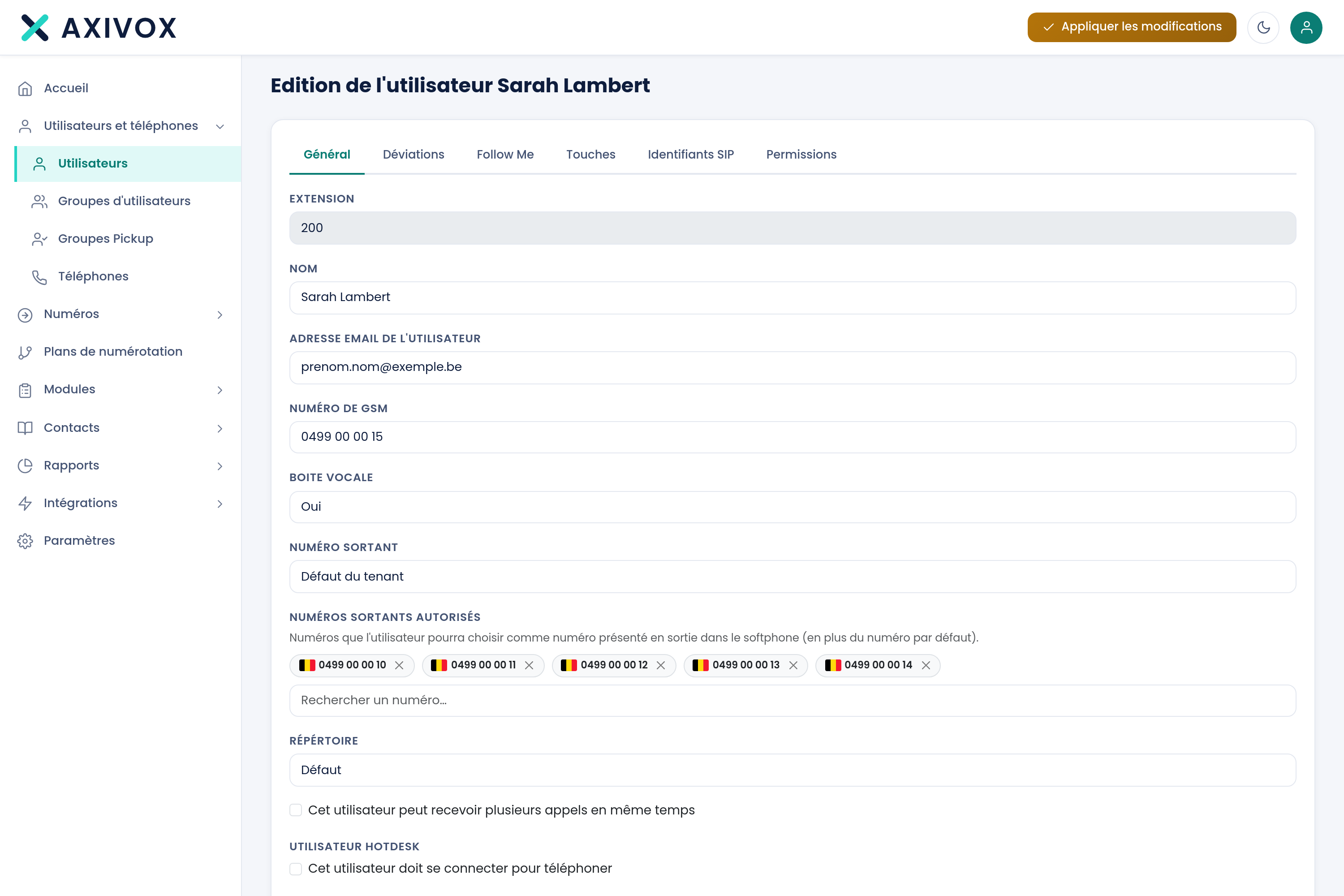
The eleven settings
| Setting | Type | What it is for |
|---|---|---|
| Extension | Text | The extension's internal number. It is what gets dialed internally |
| Name | Text | The name shown on your colleagues' phones during an internal call |
| User's email address | Recipient of voicemail messages received, if voicemail is active | |
| Mobile number | Text | The person's mobile. It becomes a suggested destination in deviations and Follow Me |
| Voicemail | Yes or No | Enables the extension's voicemail |
| Outgoing number | List | The number shown to the person you are calling. See the next section |
| Allowed outgoing numbers | Text | Restricts the numbers this extension can display |
| Directory | List | The directory visible from this extension |
| This user can receive multiple calls | Checkbox | Allows a second call during a conversation |
| This user must log in to make calls | Checkbox | Requires authentication before being able to place a call |
| Record outgoing calls for this user | Checkbox | Enables systematic recording of outgoing calls |
Outgoing number display
This is the tab's most strategic setting, and the one most often left at its default.
The Outgoing number list offers "Tenant default" then each of your incoming numbers, one per line. On a setup with twelve numbers, you therefore have thirteen choices.
- Tenant default: the extension shows the company's main number. This is the standard behavior.
- A specific number: the extension shows that number. This is used to give a direct line to a salesperson, or to have a department show its own number.
Allowed outgoing numbers
This text field limits what the extension can display. It is used when you let the user choose their outgoing number from their softphone: the list offered is then restricted to the numbers allowed here.
The three checkboxes
This user can receive multiple calls
Unchecked, a second caller gets a busy signal, or the "on busy" deviation if you have set one up. Checked, the extension signals the second call during the conversation.
This user must log in to make calls
Useful on a shared extension, for example in a workshop or a reception desk staffed by several people. As long as nobody is logged in, the extension cannot place a call.
Record outgoing calls for this user
Enables recording of all of the extension's outgoing calls.
Saving
The Save button saves the record. Cancel returns to the list without keeping your changes.
Everything you can set from your interface
See the features