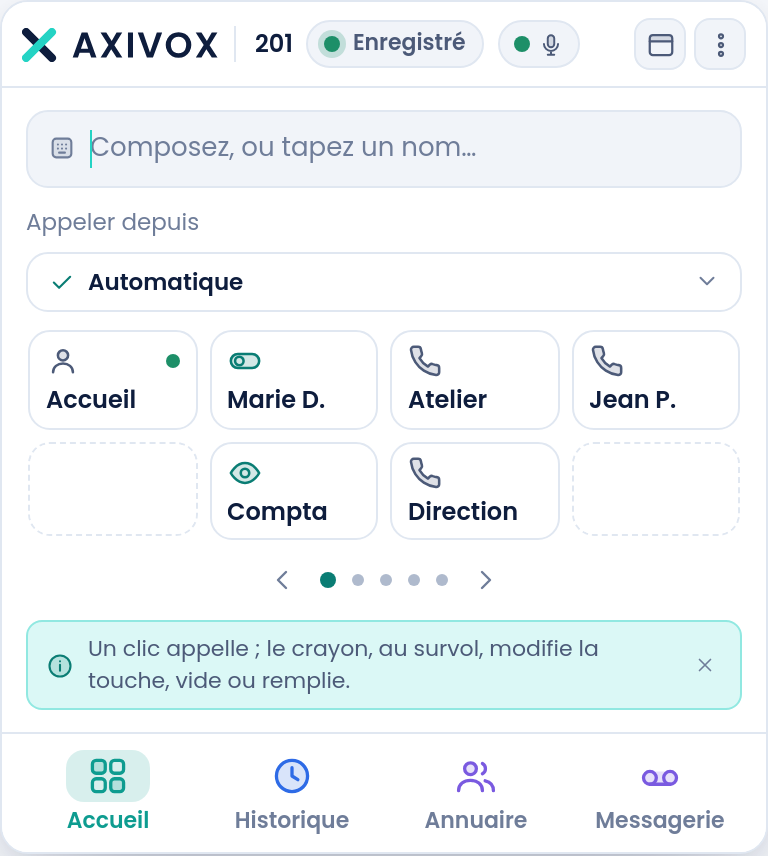
Software that replaces the desk phone, or goes alongside it. Same number, same directory, same rights, at the office as at home. And moves no handset can make: dragging a call onto a colleague, taking it with you on mobile, opening a ticket in the CRM.
In normal view, the window is compact and follows the content: it fits in a corner of the screen next to your other software.
In receptionist mode, it widens: the forty keys for your colleagues and departments show all at once, in five groups you name yourself, and the full height stays free for calls. It's the extension for whoever greets and routes calls all day.
Each key shows the colleague's presence live
Groups carry your own names: Reception, Workshop, Management
You switch between layouts with one button
The softphone: named keys, the number presented, the tabs.
Transfer
Drag the call onto a colleague
You grab the call's card and drop it onto a colleague's key. A choice appears: transfer directly, or announce first by talking to the colleague while the caller waits.
And the move works even on a call that's still ringing: you send it on without having to pick up. That's how a physical switchboard extension behaves, rarely a piece of software.
Dragging also works by touch, on a touchscreen
Keys that can't take the call fade out
A Transfer button does the same thing, if you prefer
What it can do
The moves a handset never had
The CRM acts, it doesn't just open
From the call, you open the contact's record, but you also create a ticket in the right team, an opportunity, a note, an activity, a meeting on the calendar or a signature request. All of it written into your tool, under your name, after you confirm it.
Taking the call with you on mobile
One tap moves the call in progress to your mobile, without hanging up. Another brings it back to the extension. If the mobile doesn't answer, the call comes back.
Dialling from the desk phone
You click in the software, your desk phone picks up hands-free and dials. The convenience of click-to-call, for those who keep their handset.
The right number for the country
You choose, call by call, the number shown. Or let it happen automatically: the number for the country you're calling is picked for you if you own one, and the other party answers more readily.
Listen, whisper, join
To coach an agent: listen without being heard, whisper an answer the customer can't hear, or join the conversation. The right is set on both sides, the supervising extension and the supervised one.
Visual voicemail
Your messages as a list, with their transcript. You read the one that matters and skip the rest, with no number to dial. Shared mailboxes land in the same list.
One single field
Digits dial, letters search
One bar at the top of the screen. Type a number, Enter calls. Type a name, and it searches everywhere at once: your keys, your colleagues, your history, and your CRM's address book, with results grouped by source.
The search also works by digits, not just by name
An unknown caller becomes a contact with one button
The history states why a call didn't go through, in plain words
The same extension, reachable on the softphone and on the desk phone.
What it runs on
Installed, or not at all
The software exists for Windows and macOS. The same thing runs in a browser tab, with nothing to install and no admin rights needed: handy for a shared workstation, a temp, or when IT locks down the machines.
Voice runs over WebRTC on a secure WebSocket, encrypted
Opus and G.722 codecs, HD voice between colleagues